TreeGrid mode
The TreeGrid mode of the Grid component is available in the PRO version only.
TreeGrid mode of the Grid component allows showing the nested tabular data.
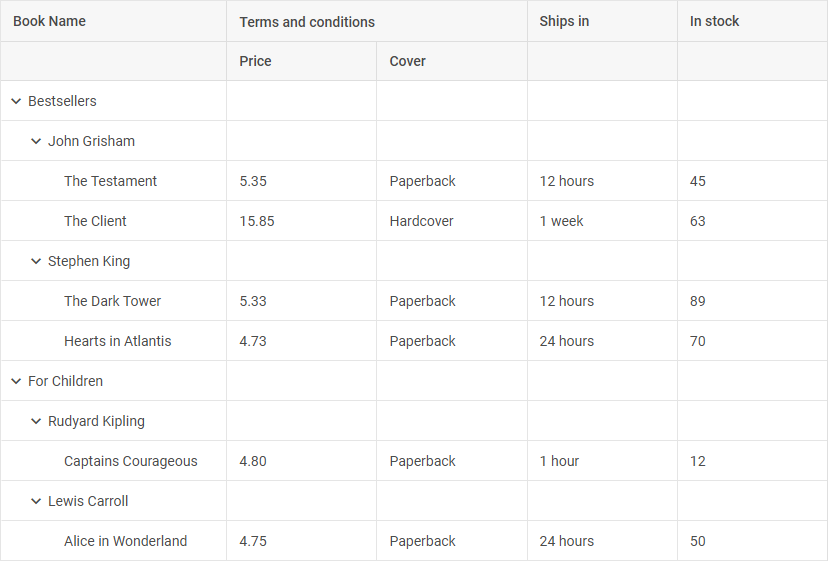
Initialization
To initialize Grid in the TreeGrid mode, make use of the type: "tree" configuration option.
const Grid = new dhx.Grid("grid_container", {
    type: "tree",
    columns: [
        { id: "name", header: [{ text: "Name" }], gravity: 1.5 },
        { id: "native", type: "string", header: [{ text: "Native name" }], gravity: 1.5 },
        { id: "capital", type: "string", header: [{ text: "Capital" }] },
        { id: "currency", type: "string", header: [{ text: "Currency" }] }
    ],
    data: dataset,
    autoWidth: true
});
Configuration
Grid in the TreeGrid mode uses all the same configuration options available in the API of the default Grid.
There is also a set of properties you can provide for Grid in the TreeGrid mode to optimize its configuration for your needs. They are described below.
Collapsed mode
To initialize Grid in the TreeGrid mode in the collapsed state, use the collapsed property:
const grid = new dhx.Grid("grid_container", {
    type: "tree",
    columns: [
        // columns config
    ],
    data: dataset,
    collapsed: true
});
Related sample: Grid (TreeGrid). Collapsed mode
Defining the id of the root parent
To define the id of the root parent, use the rootParent configuration property:
const grid = new dhx.Grid("grid_container", {
    type: "tree",
    rootParent: "root",
    columns: [
        { width: 340, id: "name", header: [{ text: "Name" }] },
        { width: 340, id: "native", type: "string", header: [{ text: "Native name" }] },
        { width: 260, id: "capital", type: "string", header: [{ text: "Capital" }] },
        { width: 260, id: "currency", type: "string", header: [{ text: "Currency" }] }
    ],
    data: dataset
});
When Grid is initialized in the TreeGrid mode, the root parent takes the id of the Grid container by default. If the id of the container is set to null or defined as an HTML element, the value of the root parent will be auto-generated.
Data loading
There are several simple ways of loading data into Grid in the TreeGrid mode:
First, you need to prepare a data set that will be loaded into Grid in the TreeGrid mode.
Preparing data set
Grid in the TreeGrid mode expects loaded data in the JSON format.
Please note that if you specify the id fields in the tree collection, their values should be unique. You can also omit the id fields in the tree collection. In this case they will be generated automatically.
Here is an example of an appropriate data set:
const dataset = [
    {
        "id": 0,
        "a": 1,
        "b": "Linwood Long long long",
        "c": "Petersen",
        "d": "Dahlgreen Place"
    },
    {
        "id": 1,
        "parent": 0,
        "a": 2,
        "b": "Edenburg",
        "c": "Agnes",
        "d": "Gem Street"
    },
    // more columns
];
Each object in the data set contains configuration of a grid row. The structure of a row is rather flexible. It may include:
| rowId | (string | number) optional, the id of a row. In case you haven't specified ids of rows, they will be auto-generated |
| parent | (string | number) the ID of the parent row |
| columnContent | (string | number) content of a column as key:value pairs, where key is the id of a column and value is any content you want to add into the column |
Loading data on Grid initialization
You can specify data you want to load into Grid in the TreeGrid mode on the initialization stage. Make use of the data configuration property, as in:
const grid = new dhx.Grid("grid_container", {
    type: "tree",
    columns: [
        // columns config
    ],
    data: dataset
});
Related sample: Grid (TreeGrid). Initialization with config.data
Loading data after initialization
There are two ways to load data into Grid in the TreeGrid mode after its initialization:
Loading from local source
To load data from a local data source, use the parse() method of Tree Collection. Pass a predefined data set as a parameter of this method:
const grid = new dhx.Grid("grid_container", {
    type: "tree",
    columns: [
        // columns config
    ]
});
grid.data.parse(dataset);
Related sample: Grid (TreeGrid). Initialization with data.parse()
External data loading
To load data from an external file, make use of the load() method of Tree Collection. It takes the URL of the file with data as a parameter:
const grid = new dhx.Grid("grid_container", {
    type: "tree",
    columns: [
        // columns config
    ]
});
grid.data.load("../common/dataset.json");
Related sample: Grid (TreeGrid). Initialization with data.load()
The component will make an AJAX call and expect the remote URL to provide valid JSON data.
Data loading is asynchronous, so you need to wrap any after-loading code into a promise:
grid.data.load("/some/data").then(function(){
   // some logic here
});
Drag-n-drop
The drag-n-drop functionality provides the possibility to reorder items inside the grid or between several grids in the TreeGrid mode.
To enable drag-n-drop within Grid in the TreeGrid mode (reorder the items), use the dragItem property, to enable drag-n-drop between Grids in the TreeGrid mode, use the dragMode property.
Drop behaviour
You can specify the drag-n-drop behaviour of items in the Grid in the TreeGrid mode with the dropBehaviour option in the configuration object of the component.
There are three modes of behaviour of a dragged item:
- "child" - a dragged item becomes a child of the item it is dragged to
The images below show drag-n-drop behaviour of items within a Grid in the TreeGrid mode with the dropBehaviour: "child" configuration setting applied:
| Dragging an item | Result |
|---|---|
 |  |
- "sibling" - a dragged item becomes a sibling of the item it is dragged to
The images below show the drag-n-drop behaviour of items within a Grid in the TreeGrid mode with the dropBehaviour: "sibling" configuration setting applied:
| Dragging an item | Result |
|---|---|
 |  |
- "complex" - a dragged item can become both a child or a sibling of a target item, depending on the position specified by highlighting
const grid = new dhx.Grid("treegrid_container", {
    type: "tree",
    columns: [
        { id: "name", header: [{ text: "Book Name" }], gravity: 1.5 },
        { id: "price", type: "string", header: [{ text: "Terms and conditions", colspan: 2 }, { text: "Price" }] },
        { id: "cover", type: "string", header: [{}, { text: "Cover" }] },
        { id: "ships", type: "string", header: [{ text: "Ships in" }] },
        { id: "inStock", type: "string", header: [{ text: "In stock" }] }
    ],
    dragItem: "both", // to activate the functionality for columns or rows separately, set the value to "column" or "row"
    dropBehaviour: "sibling" // enables one of the drop modes "child" | "sibling" | "complex"
});
Related sample: Grid (TreeGrid). Drop behaviour
Expanding collapsed rows on drag-n-drop
If you have collapsed rows in your Grid in the TreeGrid mode, they will expand automatically when you move the mouse pointer over them during drag-n-drop. To disable this functionality, set the dragExpand property to false:
const grid = new dhx.Grid("grid_container", {
    type: "tree",
    columns: [
        // columns config
    ],
    dragItem: "row",
    dragExpand: false,
    data: dataset
});
Related sample: Grid (TreeGrid). Multiselection and drag-n-drop
Work with Grid in the TreeGrid mode
While working with Grid in the TreeGrid mode, you can use the API methods of DHTMLX Grid which allow setting configuration of columns, getting an object of a particular column as well as the parameters of a certain cell. There are some methods specific for the TreeGrid mode of Grid. These are the methods for expanding/collapsing nodes.
Expanding/collapsing nodes
Expanding/collapsing a certain node
To expand a particular node in a Grid by its id, use the expand() method:
const grid = new dhx.Grid("grid_container", {
    type: "tree",
    columns: [
        { id: "name", header: [{ text: "Name" }], gravity: 1.5 },
        { id: "native", type: "string", header: [{ text: "Native name" }] },
        { id: "capital", type: "string", header: [{ text: "Capital" }] },
        { id: "currency", type: "string", header: [{ text: "Currency" }] }
    ],
    data: dataset,
    autoWidth: true
});

grid.expand("native");
To collapse a grid node, make use of the collapse() method:
const grid = new dhx.Grid("grid_container", {
    type: "tree",
    columns: [
        { id: "name", header: [{ text: "Name" }], gravity: 1.5 },
        { id: "native", type: "string", header: [{ text: "Native name" }] },
        { id: "capital", type: "string", header: [{ text: "Capital" }] },
        { id: "currency", type: "string", header: [{ text: "Currency" }] }
    ],
    data: dataset,
    autoWidth: true
});

grid.collapse("native");
Related sample: Grid (TreeGrid). Expand / collapse rows
Expanding/collapsing all nodes
It is also possible to expand/collapse all the nodes of the Grid using the two corresponding methods - expandAll() and collapseAll():
const grid = new dhx.Grid("grid_container", {
    type: "tree",
    columns: [
        { id: "name", header: [{ text: "Name" }], gravity: 1.5 },
        { id: "native", type: "string", header: [{ text: "Native name" }] },
        { id: "capital", type: "string", header: [{ text: "Capital" }] },
        { id: "currency", type: "string", header: [{ text: "Currency" }] }
    ],
    data: dataset,
    autoWidth: true
});

// expanding all the nodes
grid.expandAll();
// collapsing all the nodes
grid.collapseAll();
Related sample: Grid (TreeGrid). Expand / collapse rows
Event handling
When you work with Grid in the TreeGrid mode, you can use the API Events of DHTMLX Grid.
You can learn how to work with Grid events in the related guide.